


KELO Weather – South Dakota
3.4428.00 Reviews
App Specs
- Version
- 6.7.1.1303
- Updated On
- License
- Free
- Downloads
- 100,000+
- Developer
- Nexstar Inc.
- Categories
- Weather
- Platform
- Android
Screenshots
 Analysis by AppCompare
Hey there, weather enthusiasts! I recently got my hands on the KELO Weather – South Dakota app, and boy, do I have some insights to share with you. Whether you’re a local or planning a visit, this app is like having a mini meteorologist in your pocket. Let’s dive in and see what makes it tick.
Who will get the most from it?
I’d point South Dakota residents toward KELO Weather first, especially anyone whose plans regularly depend on what is happening nearby: a commute, a walk with the dog, a drive between towns, or an outdoor event. A visitor can also use it to get oriented to local conditions, but it makes most sense when the places you care about are within the area the app is built around. If you need a worldwide weather tool for a trip across several countries, a broader general-purpose service is likely a better fit.
For a practical routine, I’d check the forecast before bed to get a rough sense of tomorrow, then look again in the morning before choosing clothes or deciding when to leave. That second check matters more than trying to plan an entire day from one forecast: conditions can shift, and a forecast is guidance rather than a promise. For outdoor work or a long drive, I’d also look at radar and any relevant alerts rather than relying on the daily high and low alone.
The app is free and has an Everyone age rating, so cost and age classification are not barriers for most households. It is an Android weather app from Nexstar Inc., and its public profile shows an average rating of 3.4 from around 1,200 ratings, with over 100,000 installs. That is a mixed reception rather than a clear endorsement, so I would treat it as a useful local option to try, not as a guarantee that every person will like its interface or performance.
What’s in the Forecast?
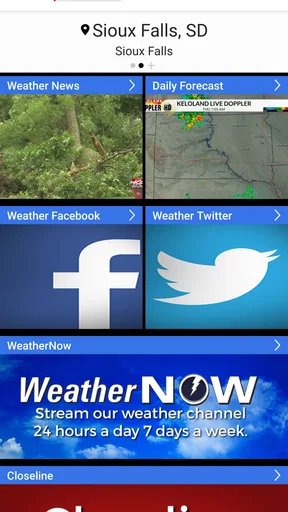
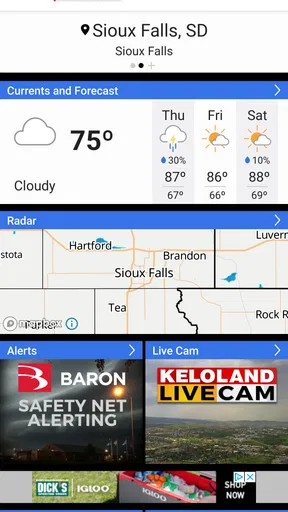
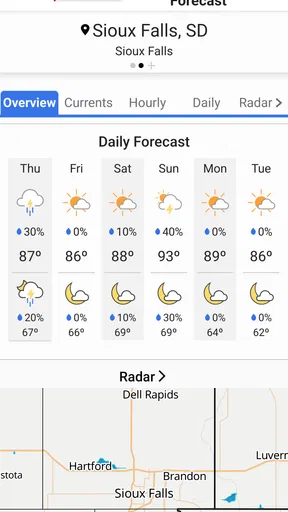
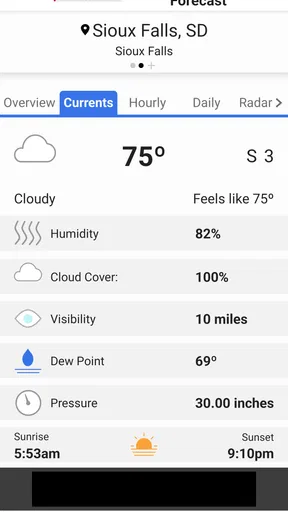
First off, the user interface of the KELO Weather – South Dakota app is pretty sleek. Everything is laid out in a way that even my grandma could navigate through it without a hitch. When you open the app, you’re greeted with a clean dashboard that gives you an instant overview of the current weather conditions. It’s straightforward and, dare I say, kind of fun to use.
Using the forecast without over-trusting it
The useful question is not only whether an app gives a forecast, but how I use the information when a decision has consequences. For an ordinary errand, a quick glance at the current conditions may be enough. For a long drive or an outdoor commitment, I’d compare the hourly outlook with the radar and leave room for conditions to change. A tidy dashboard makes checking easy, but it cannot remove the uncertainty that comes with weather.
Compared with a generic weather app, a local station’s offering can feel more relevant when you want regional context and weather coverage tied to a familiar area. A phone’s built-in weather app may be quicker for a glance, and a national service may suit people who move between many locations. I’d choose KELO when South Dakota is the focus and I want its local weather material in one place; I would not expect it to replace every tool I use for travel planning or specialist forecasting.
Worth Reading Before You Choose

EA SPORTS FC Mobile 26 Is a Bigger Football Game, but It Takes Time

Flipboard Shows What News Apps Must Do Beyond the Feed

Switching to Android Auto Means Rethinking Your Driving Routine

Google Calendar Makes a Crowded Week Easier to Manage

Ludo King Makes the Most of the Minutes Between Plans

Baby Panda World Brings Quick Play to Modern Phones, but Its Game Library Feels Busy
The app’s history goes back to October 16, 2012, and the current version is 6.7.1.1303. That tells me it has been around as a product, but age alone is not proof that every screen will feel modern or that every forecast will suit my needs. On Android, it requires version 7.0 or later, which is worth checking before trying to install it on an older device.
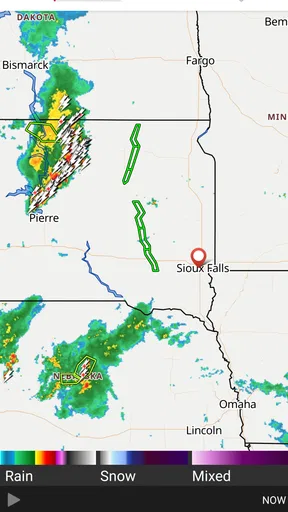
The app provides real-time radar updates that are super detailed. I’m talking about tracking every little rain cloud that might hover over your area. It’s like playing a game of tag with the weather, and you’re not "it." The radar animation is smooth and informative, offering a play-by-play of weather patterns sweeping across the state.
Detailed Weather Reports
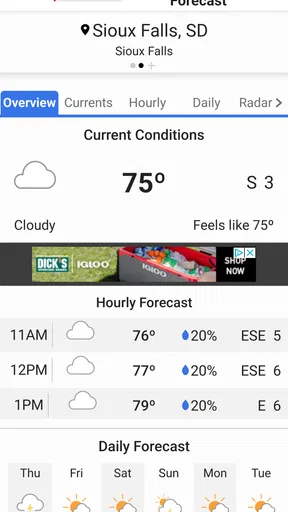
What really sets this app apart is its comprehensive weather reports. You don’t just get the temperature; you get a full breakdown, including humidity levels, wind speed, and even UV index. This is golden for those of us who like to plan our day around the weather. Want to know if it’s safe to leave your umbrella at home? This app’s got you covered.
I find those extra readings most useful when they answer a specific question. Wind speed can help me decide whether a breezy day is merely uncomfortable or a reason to rethink an outdoor setup; humidity adds context to how warm the air may feel; and the UV index is a reminder that a mild temperature does not necessarily mean low sun exposure. Rather than scanning every number automatically, I’d check the measure that relates to the plan I’m making.
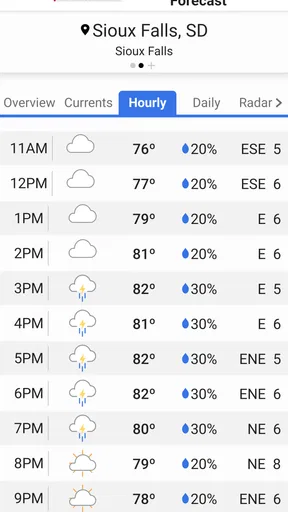
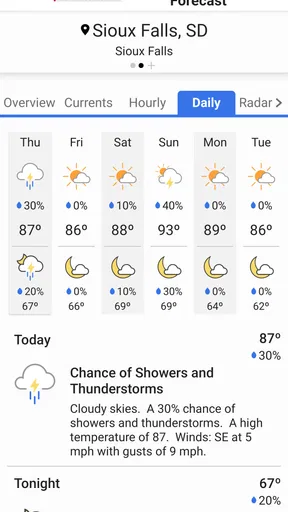
And let’s talk about the forecasts. The app provides hourly and 10-day forecasts that are surprisingly accurate. It’s like having your own personal weather station without the fancy equipment. The level of detail is impressive, and it’s regularly updated to ensure you’re getting the most current information. No more surprises when you step outside!
For a weekend plan, I would use the longer outlook to decide whether an idea seems sensible, then rely more on the nearer hourly view as the day approaches. A forecast several days away is better for broad planning than for choosing an exact departure time. That simple distinction helps prevent a common mistake: treating a long-range forecast as a fixed schedule instead of a changing estimate.
Alert System That Keeps You Ahead
One of the standout features is the alert system. You can set up notifications for severe weather alerts, which is crucial, especially in a place like South Dakota where the weather can change in the blink of an eye. The app sends timely alerts for conditions like thunderstorms, tornadoes, and snow warnings. Trust me, receiving these alerts in advance can be a lifesaver.
Notifications are most valuable when they are both noticeable and manageable. I’d keep the alerts that matter for my location and daily routine, then review the choices rather than enabling every possible notice by default. If a phone is muted, left behind, or low on battery, an app notification should not be the only part of a severe-weather plan. I’d use the app as one useful source of awareness, not as a substitute for paying attention to official local guidance.
The alerts are customizable, so you can choose what kind of notifications you want to receive. This way, you won’t be bombarded with unnecessary information. It’s all about getting the right details at the right time, keeping you prepared for whatever Mother Nature throws your way.
Trust, choices, and everyday privacy
Weather apps can invite a more personal choice than they first appear to: whether to share a device’s location or select places manually. I’d look at the permission prompt when it appears and choose only what matches how I want to use the app. If I mainly check one town, a manually selected location may be enough; if I want conditions for where I am right now, location access may be more convenient. The right choice depends on the task, not on a blanket rule.
I also make a habit of reviewing notification settings after installing any weather app. That is a practical form of control: I can decide whether alerts are useful to me and reduce interruptions if they are not. On Android, app permissions can be reviewed through the device settings, so I would revisit them if my needs change. I would not assume that a permission is necessary simply because a weather app asks for it; I’d consider what feature I’m trying to use and make an informed choice.
Weather checks can happen in private, ordinary moments: at home before the day starts, at work before stepping outside, or while arranging a pickup. I’d avoid tapping through settings while driving, and I would not treat a radar image as a reason to handle a phone behind the wheel. Checking before setting off is safer and usually gives me the information I need without distraction.
There are also times I would choose another option. If I want a simple glance with no extra local reporting, the built-in weather app may be less involved. If I need a forecast for many regions or a specialized tool for a particular activity, I would compare services designed for that broader or narrower purpose. KELO Weather is most appealing when I want South Dakota-focused conditions, reports, and alerts together; the regional focus is a strength for local use and a limitation for someone whose weather needs are spread far beyond the state.
Beyond the basics, the app offers a few nifty extras that are worth mentioning. There’s a section dedicated to weather-related news, which keeps you informed about any major changes or events happening around South Dakota. It’s a nice touch that adds depth to the app’s functionality.
I’d treat the news section as context rather than as a replacement for a forecast. If a weather event is affecting plans, a report can help explain why local conditions matter, while the hourly forecast and radar are more directly useful for deciding when to leave or whether to postpone something. Keeping those jobs separate makes the app easier to use: news for background, forecast tools for timing.
Also, the app includes a video section with weather reports and updates. These videos are quick and informative, perfect for when you’re on the go and need a quick briefing. I found them quite engaging, and they provide a more dynamic way to consume weather information.
Video is a useful alternative when I want someone to talk through a weather situation rather than interpret a screen full of symbols. It is less convenient when I need a fast, quiet check or have limited time, so I would not make it my first stop for a quick departure decision. A short routine works better: glance at conditions, use radar or the hourly forecast when timing matters, and open a report or video when I want added explanation.
The Final Forecast
In summary, the KELO Weather – South Dakota app is a must-have for anyone living in or visiting the area. It’s user-friendly, packed with features, and offers the kind of detailed information that helps you plan your day down to the last detail. Whether you’re a weather geek or just someone who likes to stay informed, this app delivers.
So, if you’re tired of getting caught in unexpected downpours or just want to keep an eye on the sky, give this app a try. It’s like having a weather expert in your pocket, ready to dish out the latest updates whenever you need them. Stay dry, stay informed, and most importantly, stay ahead of the weather!
My cautious recommendation is to try it if South Dakota is where your everyday weather decisions happen. I would not install it expecting every forecast to be exact or assuming that a local app automatically suits every traveler; I’d judge it by whether its radar, reports, alerts, and presentation fit my routine. If I were choosing today, I’d start with a simple setup, keep only the notifications I genuinely want, and compare its outlook with what I observe when plans are weather-sensitive.
Pros
- Accurate local weather forecasts.
- User-friendly interface and design.
- Real-time severe weather alerts.
- Detailed radar and satellite maps.
- Customizable notification settings.
Cons
- Limited to South Dakota region.
- Ads may interrupt user experience.
- No offline mode available.
- Limited customization for widgets.
- Occasional app crashes reported.
FAQs for KELO Weather – South Dakota
What features does the KELO Weather app offer?
The KELO Weather app provides users with current weather conditions, hourly and daily forecasts, interactive radar, and severe weather alerts. It also includes detailed weather maps and video updates. The app is designed to provide accurate weather information specifically for South Dakota, ensuring users are well-prepared for any conditions.
Is the KELO Weather app free to download and use?
Yes, the KELO Weather app is free to download on both Android and iOS platforms. While the app provides a comprehensive range of features for free, users should be aware that it may contain ads. There could also be optional in-app purchases for an ad-free experience or additional features.
How accurate is the weather information provided by the KELO Weather app?
The KELO Weather app is known for delivering highly accurate weather forecasts tailored for South Dakota. It utilizes advanced technology and data from reliable meteorological sources. However, as with any weather app, users should consider cross-referencing with additional sources during critical weather conditions for the most reliable updates.
Does the KELO Weather app provide severe weather alerts?
Yes, the KELO Weather app offers real-time severe weather alerts. Users can receive notifications for storms, tornadoes, or other hazardous weather conditions. These alerts are crucial for staying informed and safe, especially during extreme weather events in South Dakota. Users can customize alert settings to suit their preferences.
Can I use the KELO Weather app for locations outside South Dakota?
While the KELO Weather app is optimized for South Dakota, it does support weather information for other locations. However, its specialty lies in providing detailed and localized forecasts for South Dakota, making it most effective for residents or those traveling within the state. For broader usage, consider cross-referencing with other national weather apps.


